
10XLabs Container Platform
Pioneering container platform started in 2011 — three years before Docker went mainstream — with software-defined networking and sub-second provisioning, discovered accidentally while building browser-based coding labs for the 10xEngineer e-learning startup.

Key metrics
Architecture
Early container orchestration with a service mesh on Open vSwitch, Chef-built images with snapshot, image and recipe registries, and ZFS copy-on-write storage — running on AWS and locally.
Case study
10XLabs Container Platform
Pioneering container orchestration platform started in 2011 — three years before Docker went mainstream with 1.0 in 2014 — implementing an Open vSwitch service mesh, ZFS copy-on-write storage, Chef-built images with snapshot and registry support, and sub-second provisioning - achieving 375-2000x speedup over traditional VMs, running on AWS and locally.
10xLabs containers were an accidental discovery. The original problem was figuring out how to fake servers in the browser for 10xEngineer, an e-learning startup: every student needed somewhere to write and run code, and a dedicated server per student didn't scale. Solving cheap, instant, disposable per-student environments is what produced the container platform. The trail is still visible in the public repos below — the IDE (10xIDE) and compiler support (10xlabs-compile-service) gave the labs multi-language code execution without needing a dedicated server per user.
Historical Context
The Problem (2011)
Traditional Infrastructure:
- VM provisioning: 10-30 minutes
- Resource overhead: 500MB-2GB RAM per VM
- Slow boot times, heavy hypervisor layers
- No dynamic networking between instances
Existing Alternatives:
- OpenVZ/Virtuozzo: Commercial, limited adoption
- LXC: Basic container primitives, no orchestration
- Solaris Zones: Platform-locked, expensive
- VMware ESXi: Traditional VMs, slow provisioning
What was missing:
- Fast, lightweight application isolation
- Software-defined networking for containers
- Copy-on-write storage for instant, cheap provisioning
- Orchestration and management tooling
The Innovation (2011-2012)
10XLabs built a complete container platform starting in 2011 — two years before Docker was open-sourced (March 2013) and three years before Docker 1.0 and Docker Hub (2014) — featuring:
- ZFS Copy-on-Write Storage: Containers cloned from template snapshots for instant provisioning
- Service Mesh on Open vSwitch: Software-defined overlay networks and custom topologies between containers
- Chef as the Build Language: Images built declaratively from Chef recipes
- Snapshots and Image Registries: Container snapshots plus registries for built images
- Portable Image Format with a Public Hub: 10xLabs ran its own hub as a public image repository
- Package Registries of Chef Recipes: Reusable, versioned build components
- Developer Laptop CLI and Web UI: Local tooling and UI/UX for developers
- Sub-Second Provisioning: 375-2000x faster than VMs
- Resource Isolation: cgroups + namespaces for secure multi-tenancy
- Orchestration APIs: RESTful management interface
- Ran on AWS and Locally: Same platform on cloud instances and on-prem hardware
Architecture Overview
graph TB
    subgraph "Management Layer"
        API[REST API
Container Management]
        ORCH[Orchestrator
Placement + Scheduling]
        UI[Web UI
Dashboard]
        REG[Registries
Images + Chef Recipes]
        CHEF[Chef Builds
Recipes to Images]
    end

    subgraph "Container Runtime"
        CG[cgroups
Resource Limits]
        NS[namespaces
Process Isolation]
        UFS[ZFS
Clones + Snapshots]
    end

    subgraph "Networking Layer"
        SDN[Service Mesh
Open vSwitch Overlay]
        VLAN[Virtual Networks
Per-Container]
        FW[Firewall
Security Groups]
    end

    subgraph "Host Cluster"
        H1[Host 1
10+ Containers]
        H2[Host 2
10+ Containers]
        H3[Host 3
10+ Containers]
    end

    API --> ORCH
    UI --> API
    CHEF --> REG
    ORCH --> REG
    ORCH --> CG
    ORCH --> NS
    ORCH --> UFS
    ORCH --> SDN
    SDN --> VLAN
    VLAN --> FW
    CG --> H1
    NS --> H1
    UFS --> H1
    CG --> H2
    NS --> H2
    UFS --> H2
    CG --> H3
    NS --> H3
    UFS --> H3

    style SDN fill:#4f46e5
    style UFS fill:#dc2626
    style ORCH fill:#059669
Core Technologies
1. Linux Container Primitives
cgroups (Control Groups):
# Create cgroup for container
cgcreate -g cpu,memory:container-1234

# Set CPU limit (50% of 1 core)
cgset -r cpu.cfs_quota_us=50000 container-1234
cgset -r cpu.cfs_period_us=100000 container-1234

# Set memory limit (512 MB)
cgset -r memory.limit_in_bytes=536870912 container-1234

# Run process in cgroup
cgexec -g cpu,memory:container-1234 /app/process
namespaces (Process Isolation):
// Create isolated container namespaces
int clone_flags =
    CLONE_NEWUTS |   // Hostname
    CLONE_NEWPID |   // Process IDs
    CLONE_NEWNET |   // Network stack
    CLONE_NEWNS |    // Filesystem mounts
    CLONE_NEWIPC;    // IPC objects

// Clone process into new namespaces
pid = clone(container_init, stack, clone_flags, &config);
Namespace Types:
- PID: Each container sees its own process tree (PID 1)
- NET: Isolated network stack (interfaces, routing, iptables)
- MNT: Private filesystem mount points
- UTS: Separate hostname and domain name
- IPC: Isolated message queues and semaphores
2. ZFS Copy-on-Write Storage
Container storage was ZFS, not a union filesystem. Each container was a ZFS dataset cloned from a template snapshot — copy-on-write, so a new container shared all of the template's blocks and cost almost nothing to create:
Template → Container Provisioning:
┌──────────────────────────────────┐
│ Template Snapshot (read-only)    │
│ templates/ubuntu-10.04@rev1      │ ← Built by Chef
│ (Ubuntu 10.04 LTS, Python 2.7)   │
└───────────────┬──────────────────┘
                │ zfs clone (copy-on-write)
    ┌───────────┼───────────┐
    ▼           ▼           ▼
 lxc/cont-1  lxc/cont-2  lxc/cont-3   ← Per-container datasets
 (quota'd)   (quota'd)   (quota'd)      Only diverging blocks stored
Benefits:
- Fast Provisioning:
zfs clonefrom a template snapshot — no disk copy - Storage Efficiency: Clones share the template's blocks; only changes consume space
- Snapshots: First-class
zfs snapshotof any container, pushed to the image registry - Instant Rollback:
zfs rollbackto any named snapshot - Quotas: Per-container disk limits via
zfs set quota - Host-to-Host Streaming:
zfs send/zfs receivemoves container state between hosts
Implementation (the pool-node host toolchain drives these directly — see lib/10xengineer-node/vm_commands.rb):
# Provision: clone container dataset from a template snapshot
zfs clone -p templates/ubuntu-10.04@rev1 lxc/cont-1234

# Enforce per-container disk quota
zfs set quota=10G lxc/cont-1234

# Snapshot and rollback container state
zfs snapshot lxc/cont-1234@before-upgrade
zfs rollback -r lxc/cont-1234@before-upgrade

# Stream a container snapshot to another host / the registry
zfs send lxc/cont-1234@release | mbuffer -q -m 128MB | zfs receive tank/cont-1234@default
The dataset naming in the repo (lxc/<container-id>) also documents the runtime pairing: LXC containers on ZFS datasets, with the platform's orchestration, networking and build tooling on top.
3. Service Mesh on Open vSwitch (SDN)
The networking layer was a service mesh built on Open vSwitch: each host ran an Open vSwitch instance, and the platform programmed flows to give containers isolated virtual networks spanning hosts. The original architecture diagram (the hero image above) shows this layer as it was drawn at the time: a Serval / Open vSwitch / OpenFlow service discovery layer sitting between hosts, backed by a deduplicated filesystem and local/remote memory page caches — applications faulted in only the pages actually running, which is where the lightweight footprint and fast startup came from.
Overlay Network Architecture:
Physical Network:
  Host A (10.0.1.10) ←───────→ Host B (10.0.1.20)

Virtual Networks:
  Network 1 (172.16.0.0/24):
    Container A1 (172.16.0.10) ←──→ Container B1 (172.16.0.20)

  Network 2 (172.17.0.0/24):
    Container A2 (172.17.0.10) ←──→ Container B2 (172.17.0.20)
VXLAN Tunneling:
# Create VXLAN interface for virtual network
ip link add vxlan100 type vxlan \
  id 100 \
  dstport 4789 \
  local 10.0.1.10 \
  dev eth0

# Attach container to VXLAN network
ip link add veth-cont1 type veth peer name veth-host1
ip link set veth-cont1 netns container-1234
ip link set veth-host1 master vxlan100

# Container now on overlay network
# Can communicate with containers on other hosts
Network Features:
- Open vSwitch Mesh: Programmable virtual switching on every host
- Isolation: Each virtual network fully isolated (Layer 2 separation)
- Multi-Tenancy: Multiple customers on same hardware with network isolation
- Dynamic Topology: Create/destroy networks via API
- Security Groups: Firewall rules per container
- Load Balancing: Distribute traffic across container replicas
4. Container Orchestration
API-Driven Management:
# Create container via REST API
POST /api/containers
{
  "image": "myapp:v1.2",
  "cpu": 1.0,
  "memory": "512MB",
  "network": "production-network",
  "ports": [{"host": 8080, "container": 80}],
  "environment": {
    "DB_HOST": "postgres.internal",
    "API_KEY": "secret"
  }
}

# Response:
{
  "id": "cont-abc123",
  "status": "running",
  "ip": "172.16.0.45",
  "provisioned_in": "1.2 seconds"
}
Scheduler Features:
- Bin Packing: Efficient resource utilization across hosts
- Affinity Rules: Place related containers on same host
- Anti-Affinity: Spread replicas for high availability
- Resource Limits: Enforce CPU/memory quotas
- Health Checks: Automatic restart of failed containers
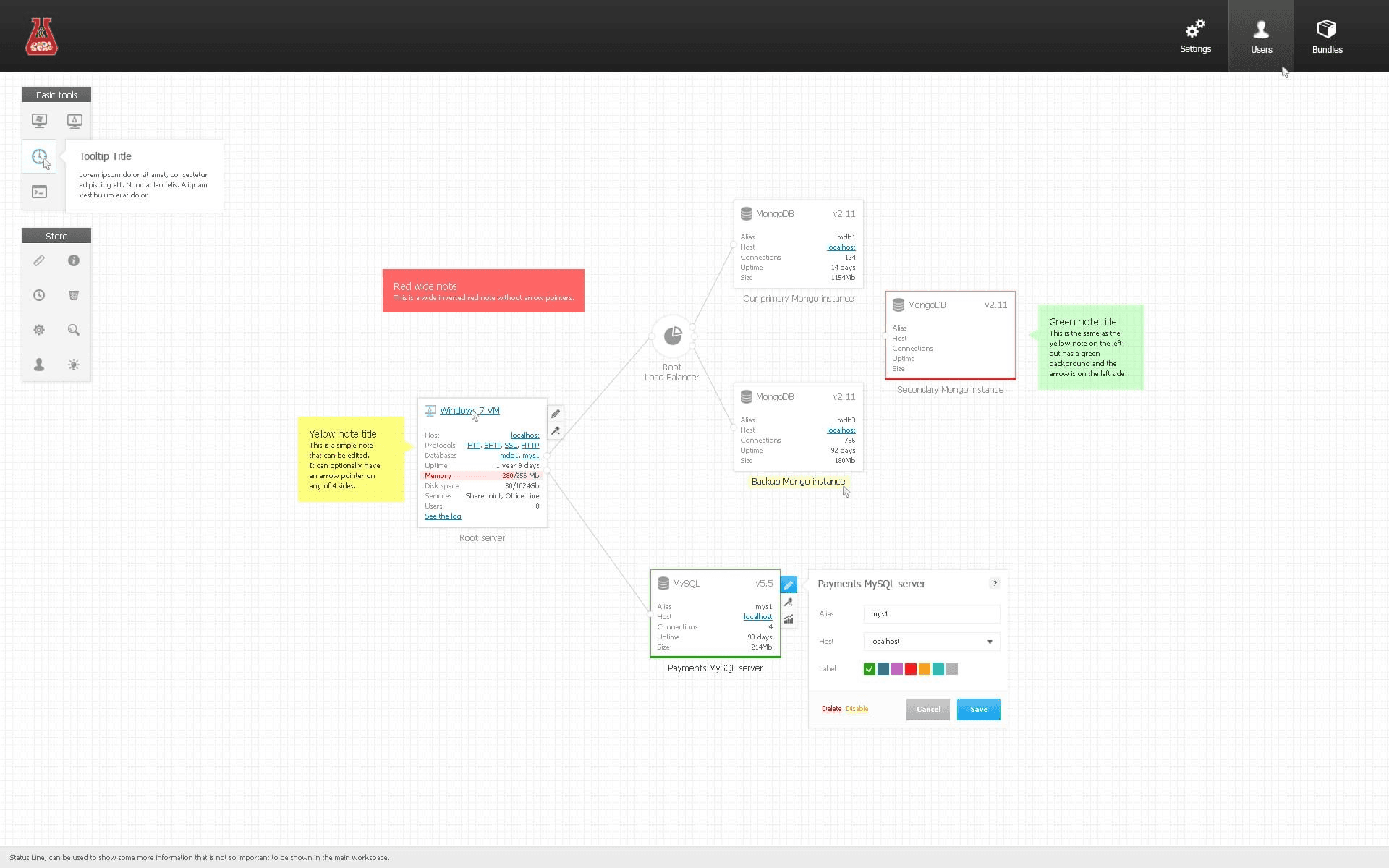
The web UI included a visual topology designer — running services (load balancers, databases, VMs) drawn as a live graph with inline editing and annotations:
Performance Metrics
Provisioning Speed Comparison
| Platform | Provisioning Time | Speedup vs VM |
|---|---|---|
| Traditional VM | 10-30 minutes | 1x (baseline) |
| 10XLabs Containers | 0.5-3 seconds | 375-2000x |
Example Workflow:
VM Provisioning (20 minutes):
├─ Image download: 5 min
├─ Disk allocation: 2 min
├─ Boot kernel: 1 min
├─ Init services: 5 min
├─ App startup: 7 min
└─ Total: 20 minutes

Container Provisioning (1 second):
├─ Layer check: 0.1s (already cached)
├─ Namespace create: 0.2s
├─ Network setup: 0.3s
├─ Process start: 0.4s
└─ Total: 1 second
Resource Efficiency
| Metric | Traditional VM | 10XLabs Container |
|---|---|---|
| Memory Overhead | 512MB-2GB | 5-20MB |
| Disk Overhead | 5-20GB | 10-100MB (CoW clones) |
| Boot Time | 30-60 seconds | <1 second |
| Density | 5-10 per host | 50-100+ per host |
Key Features
Sub-Second Provisioning
- ZFS clones: No full disk copy needed
- Shared template blocks: Instant container creation
- Lightweight isolation: No hypervisor overhead
- Fast networking: Software-defined overlay
Software-Defined Networking
- VXLAN overlays: Cross-host container communication
- Virtual networks: Isolated Layer 2 segments
- Dynamic routing: Automatic service discovery
- Security groups: Per-container firewall rules
Multi-Tenancy
- Resource isolation: cgroups enforce limits
- Network isolation: Separate virtual networks per tenant
- Storage isolation: Per-container ZFS datasets with quotas
- API authentication: Role-based access control
Build & Distribution
- Chef as the build language: Images built from declarative Chef recipes
- Portable image format: Images moved between hosts and environments
- Image registries and public hub: Built images stored and distributed from registries, including 10xLabs' own public hub
- Package registries of Chef recipes: Versioned, reusable build components
- Snapshots: Capture and republish running container state
- Developer laptop CLI and web UI: Local developer tooling alongside the platform UI
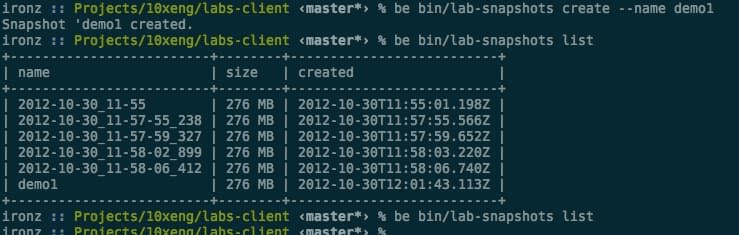
The lab-snapshots CLI creating and listing container snapshots — terminal output timestamped 2012-10-30, five months before Docker's release:
Runs Anywhere
- AWS: Provisioned host nodes on EC2
- Local / on-prem: Same platform on local hardware
- One API: Identical management surface in both environments
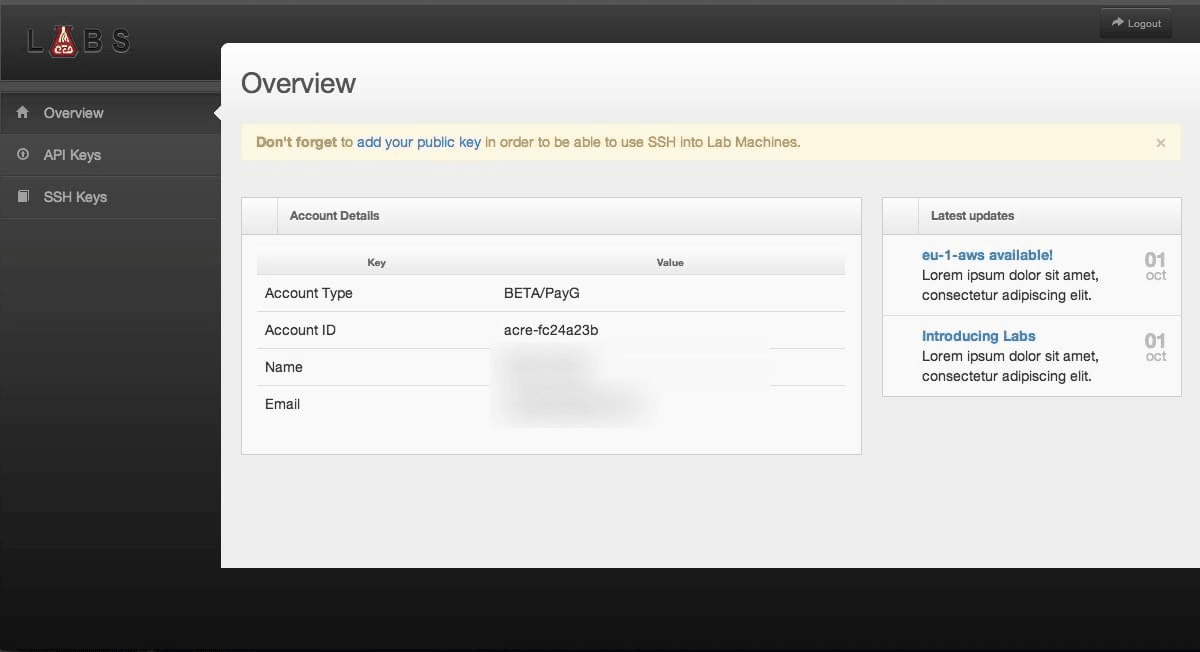
The account dashboard announcing the eu-1-aws region, with API key and SSH key management:
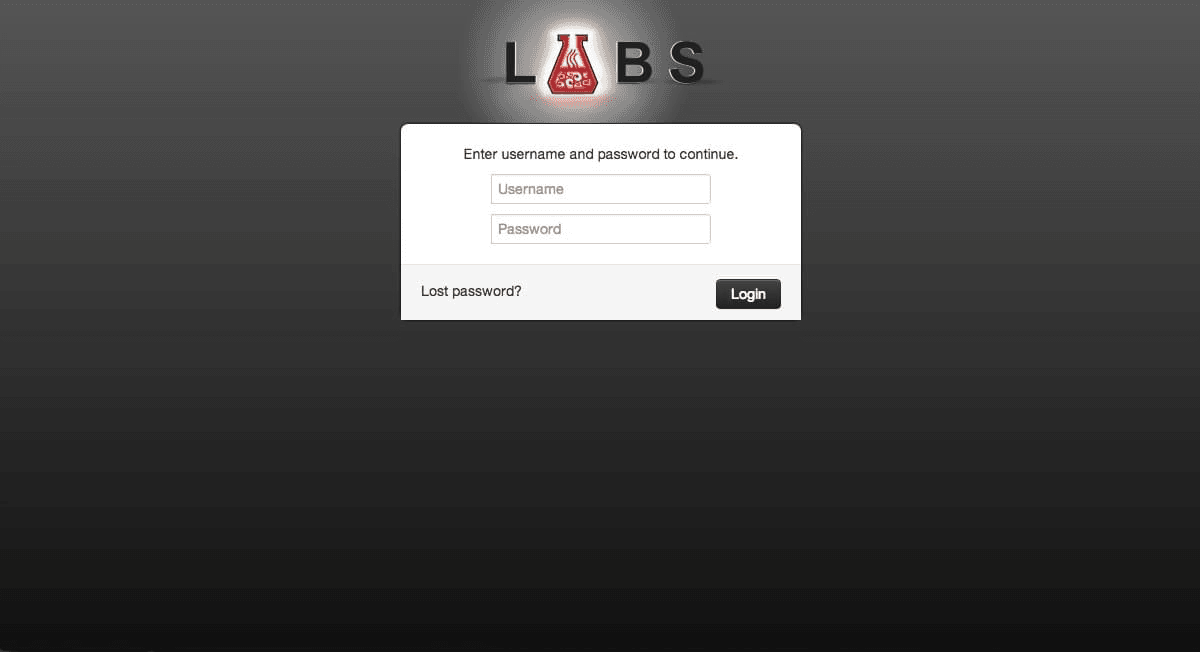
The product login screen:
Developer Experience
- Fast Iteration: Rebuild and deploy in seconds
- Consistent Environments: Same container dev to prod
- Easy Rollback:
zfs rollbackto a named snapshot - APIs for Automation: RESTful container management
Historical Significance
Timeline
2011-2012: 10XLabs Container Platform
- ZFS copy-on-write storage (clones, snapshots, send/receive)
- Service mesh on Open vSwitch (software-defined overlay networks, VXLAN)
- Chef as the build language, with package registries of Chef recipes
- Portable image format; snapshots and image registries, with its own public hub
- Developer laptop CLI and web UI
- cgroups + namespaces orchestration
- RESTful management APIs
- Sub-second provisioning
- Ran on AWS and locally
March 2013: Docker Released
- Similar runtime architecture (cgroups, namespaces; AUFS layering for storage)
- Dockerfile as a simpler build language
- Open source from day one, with massive community adoption
- Docker Hub followed in 2014, libnetwork/overlay networking in 2015
2014+: Container Ecosystem Explosion
- Kubernetes (2014): Container orchestration
- Container runtimes: containerd, CRI-O
- OCI standards: Image and runtime specs
- Cloud-native movement
What 10XLabs Got Right
- Copy-on-Write Storage: ZFS clones from template snapshots as the key to fast provisioning
- Service Mesh: Open vSwitch overlay networking solved cross-host communication early
- Build Pipeline: Chef recipes as the build language, with image and recipe registries
- API-First: RESTful management enabled automation
- Resource Isolation: cgroups + namespaces for security
- Hybrid Deployment: Same platform on AWS and on local hardware
10xLabs vs. Docker — An Honest Comparison
Docker (open-sourced March 2013) did not add capabilities that 10xLabs lacked. The harder distributed-systems pieces were already running in 10xLabs in 2011-2012. What Docker did was make containers radically simpler to adopt.
Where 10xLabs was ahead:
| Capability | 10xLabs (2011-2012) | Docker |
|---|---|---|
| Cross-host networking | Service mesh on Open vSwitch from the start | libnetwork/overlay drivers arrived 2015 |
| Portable image format | Already in use | Introduced with Docker (2013) |
| Image registries and public hub | Operational, with its own hub as a public repository; snapshots pushed to registry | Docker Hub launched 2014 |
| Build component reuse | Package registries of versioned Chef recipes | Build sharing came later via Hub |
| Developer experience | Developer laptop CLI plus web UI/UX | docker CLI (2013) |
| Multi-environment | Ran on AWS and locally from one platform | Single-host until Swarm and libnetwork (2015) |
| Container weight | Much lighter weight due to the filesystem approach, giving faster startup (the sub-second provisioning above) | Heavier per-container footprint |
What Docker did differently — and why it won:
- Dockerfile: A radically simpler build language than Chef recipes — a dozen imperative lines anyone could read, versus needing configuration-management expertise
- Open source from day one: Released openly in March 2013 into a rising DevOps movement. Community network effects drove distribution and ecosystem momentum that no single company could match
That list is deliberately short. Docker's real difference was simplicity plus open-source timing and community network effects — momentum, not capability. 10xLabs had the harder engineering earlier; Docker won on simplicity and open-source distribution. Both statements are true.
Technical Highlights
- Pre-Docker Innovation: Started in 2011 — two years before Docker's open-source release, three years before Docker 1.0
- 375-2000x Speedup: Massive improvement over VM provisioning
- Service Mesh on Open vSwitch: Early software-defined overlay networking
- Chef-Built Images: Declarative builds with image and recipe registries
- ZFS Storage: Copy-on-write clones and snapshots as the key to container efficiency
- Complete Platform: Orchestration, networking, storage, registries, APIs, on AWS and locally
Use Cases (2011-2012)
1. Web Application Hosting
Rapid provisioning for customer applications with per-customer network isolation.
2. Development Environments
Instant spin-up of dev/test environments matching production.
3. CI/CD Pipelines
Fast build/test cycles with isolated container environments.
4. Multi-Tenant SaaS
Resource and network isolation for multiple customers on shared infrastructure.
Lessons Learned
What Worked:
- Container technology was ready (cgroups, namespaces stable in Linux 3.x)
- ZFS cloning dramatically improved provisioning speed
- Open vSwitch overlay networking solved multi-host communication
- Chef recipes gave repeatable builds, with registries for images and recipes
- API-driven management enabled automation
What Was Hard:
- Standards: the portable image format and public hub were 10xLabs' own — no industry-wide standard existed yet to plug into
- Ecosystem: building mindshare alone, before an open-source container community existed
- Marketing: Hard to explain "better than VMs" to market
- Timing: Market not yet ready (pre-DevOps movement)
If Built Today:
- Would use OCI standards for image format
- Would integrate with Kubernetes for orchestration
- Would leverage containerd/CRI-O runtimes
- Would adopt Docker-compatible CLI for familiarity
Legacy & Impact
Contributions to Container Ecosystem:
- Validated copy-on-write container storage before Docker
- Proved software-defined networking for containers
- Demonstrated 100x+ speedup potential
- Informed later container platform designs
Technical Learnings:
- cgroups + namespaces sufficient for isolation
- Copy-on-write storage key to provisioning speed
- Overlay networks solve cross-host communication
- API-first design enables automation
Status
Historical invention (2011-2012) that pioneered key container technologies later popularized by Docker and Kubernetes. Demonstrated feasibility of sub-second provisioning with 375-2000x speedup over traditional VMs.
Part of MacLeod Labs DevOps & Infrastructure Portfolio
Source Code
The original 10XLabs repositories are public on GitHub under the 10xEngineer organization:
- 10xlabs-microcloud — 10xLabs MicroCloud client
- 10xlabs-compile-service — compile toolchain
- 10xLabs-ui — UI for the 10xLabs backend
- 10xlabs-bootstrap-handler — bootstrap handler
- 10xlabs-win-vm — Windows hostnode (loopback VM) management
- pool-node — host-node toolchain for MicroCloud
- 10xIDE — IDE component shared between 10xEngineer and 10xLabs
References
- Linux cgroups: https://www.kernel.org/doc/Documentation/cgroup-v1/cgroups.txt
- Linux namespaces: https://man7.org/linux/man-pages/man7/namespaces.7.html
- ZFS: https://openzfs.org/wiki/Main_Page
- VXLAN RFC 7348: https://datatracker.ietf.org/doc/html/rfc7348
- Docker announcement (2013): https://www.docker.com/blog/the-future-of-linux-containers/
Tech stack
Gallery


